Moja Assistant — free Chrome extension
A free Chrome extension for referees: list and export your Moja entries, import from your booking tools, and register a pair by licence number.
Moja is the FFT tool for registrations and sanctioning, but some tasks in it are slow and repetitive. The Moja Assistant is a browser extension that adds — right on moja.fft.fr — a clean entry list, one-click export and import from your booking tools. Everything runs with your own FFT session, and if you use Padel Clash the extension syncs your teams and ranking as a bonus.
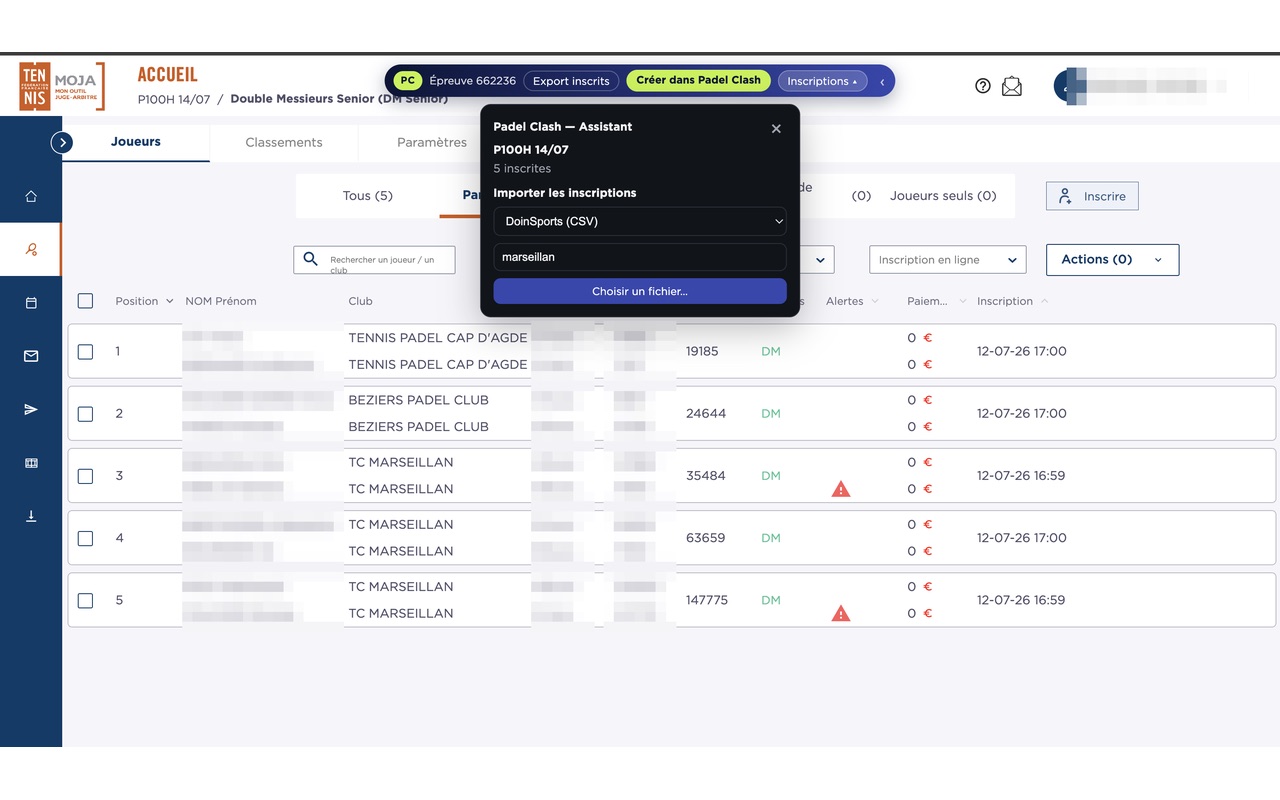
The Assistant, right inside Moja
A discreet panel is added on moja.fft.fr: view entries, export them and import from your booking tools without leaving the page.
Why a Moja assistant?
Moja does the job, but day to day some operations cost referees time.
Repetitive actions
Checking entries event by event and registering pairs one at a time is slow on large draws.
Re-typing data
Your entries often live in another tool (booking, spreadsheet) and must be re-entered by hand in Moja.
No simple export
Getting an event's entry list into a clean file isn't straightforward.
Useful from install, even without Padel Clash
These features run directly on Moja, with your FFT session. No Padel Clash account required.
Clear entry list
Show an event's pairs in a readable list: names, rankings and pair weight.
One-click export
Download an event's entry list as an Excel file, ready to share or archive.
Multi-source import
Import your entries from Padel Clash, Gestion Sport, Doinsport, PadelClub, LiveXperience or a CSV/Excel file — even when LiveXperience reorders or renames its columns.
Quick registration
Register a pair from two licence numbers, without digging through Moja's menus.
Even more with Padel Clash
If you run your tournaments in Padel Clash, the extension links the two tools with no re-typing.
Create the tournament
Create the tournament in Padel Clash from Moja, with the name, date and category pre-filled.
Two-way sync
Pull Moja registrations into Padel Clash, or register your Padel Clash teams into Moja.
Ranking to Moja
Send your tournament's final ranking back to Moja for sanctioning, in one click.
Install and use the assistant
Install the extension
Add the Moja Assistant to Chrome. Installation takes only a few seconds.
Open Moja
Go to moja.fft.fr and sign in with your usual referee account.
Use the bar
A Padel Clash bar appears on your events: entry list, export, import and registration.
Sync (optional)
If you use Padel Clash, create the tournament and sync teams and ranking.
The extension runs entirely in your browser, with your own FFT session. Nothing is sent to any third party. Read the privacy policy.
Frequently asked questions
No. On Moja the extension works on its own: the entry list, export, import from your booking tools and pair registration all use only your FFT session. Padel Clash is only needed for the sync features, which are a bonus.
Yes, the extension is completely free.
The extension is built for Google Chrome and compatible Chromium-based browsers (such as Microsoft Edge).
Padel Clash (CSV/Excel), Gestion Sport, DoinSports, PadelClub and LiveXperience, plus any CSV/Excel file. The extension resolves licences by number or by name and helps you decide when there are namesakes before registering in Moja.
Yes. The extension uses your own FFT session in your browser and sends your data to no third party. See the privacy policy for details.
No. No registration or change is sent to Moja without an explicit confirmation from you.
Because MOJA exposes no public API: the only reliable way to automate exchanges is to act inside your browser, with your own FFT session. Every Moja integration on the market works this way — Padel Clash's is free and useful even without a Padel Clash account.
No, it's an independent extension built by Padel Clash. Using your referee session, it automates actions you could do by hand in Moja: it only accesses moja.fft.fr pages and bypasses no federal check.
Go further
Ready to simplify Moja?
Install the Moja Assistant and save time on every tournament.