Everything to build the order of play
From the first match to the final, a clear schedule for players, referees and the club
The whole order of play in one click
The magic wand fills the entire order of play: it puts every match on a court, respects the round order and the minimum rest between a pair's matches. You adjust whatever you want afterwards.
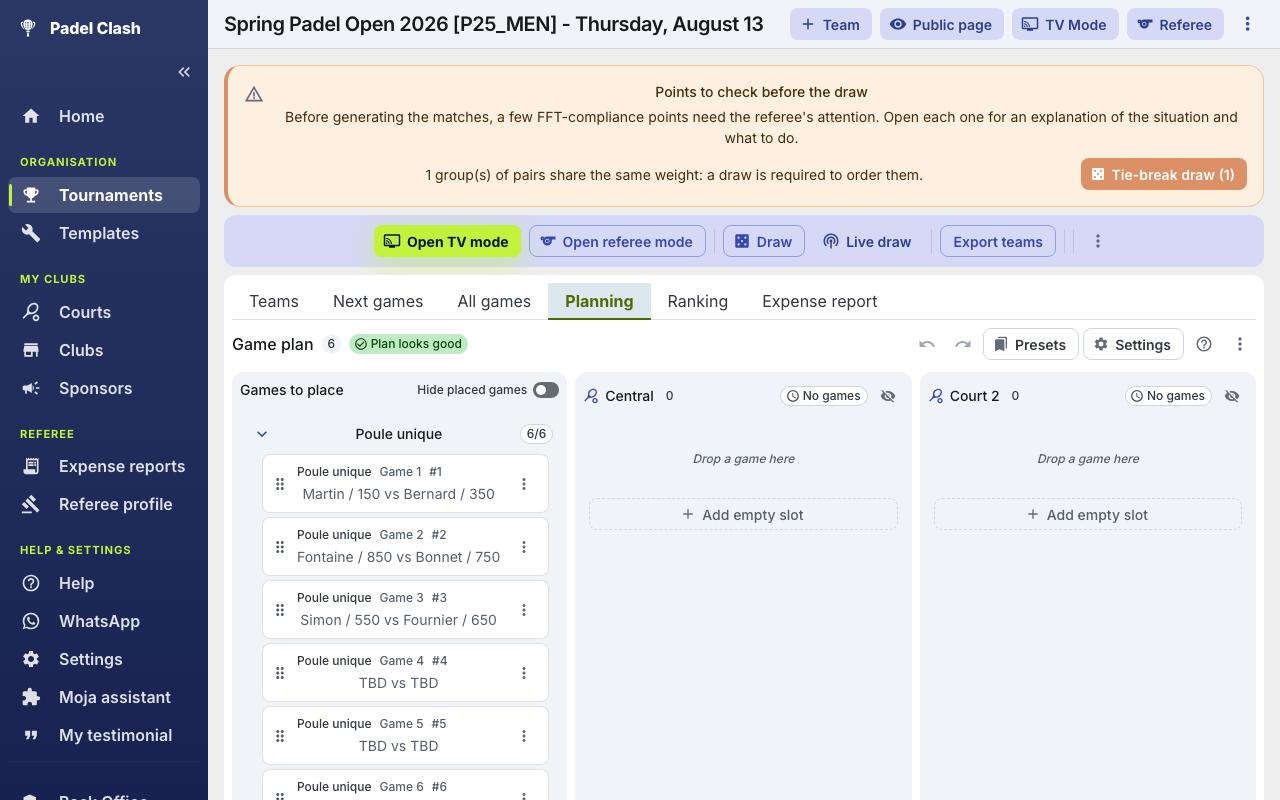
Drag & Drop by Court
Build the order of play by dragging each match onto a court. Reorder with mouse or keyboard, even mid-tournament.
Estimated Start Times
PadelClash computes an estimated start time for every match based on average match duration and each court's order of play.
Conflict Alerts
Not enough rest between two of a team's matches, or a team scheduled on two courts at the same time: the schedule warns you.
Two-Day Tournaments
Split matches between Day 1 and Day 2 with per-day start times — the public page shows one tab per day.
Bulk Moves
A court becomes unavailable? Move all of its matches to another court in a single, undoable action.
Print & Export
Print the schedule by court and time in one click, with team names and estimated times — perfect for posting at the club.
Regulation rest respected
Rest warnings follow the minimum the FFT rules impose and account for 5-minute breaks: no more alerts firing when they shouldn't.
Call times that follow the board
Each pair's call time is derived from the order of play: it updates when you move a match, and shows in the Teams tab and on the public page.
Presets shared with your club
Save your match durations, breaks and opening hours, then share them with the club's other referees: the next tournament starts already configured.
A schedule shared with everyone
The schedule isn't just an organiser tool: it's visible everywhere, in real time.
Players browse the court-by-court schedule from the public tournament page
Each team sees its check-in time and next match from their phone
Referees see the planned time and court of every match in their interface
The club's TV screen rotates through the order of play with live scores
Go further
Frequently Asked Questions
With PadelClash, first generate your tournament's matches (groups, brackets…), then drag and drop each match onto a court to build the order of play. Estimated start times are computed automatically and the schedule is shared in real time with players and referees.
PadelClash computes an estimated start time for each match from the tournament start time, the average match duration and each court's order of play. Times update as the tournament progresses.
Yes. Enable the two-day mode and assign each match to Day 1 or Day 2, with separate start times per day. The public tournament page shows one tab per day.
The schedule automatically warns you when a team doesn't have enough rest between two matches, and flags double bookings in red — a team scheduled on two courts at the same time.
Yes, in one click. The printout lays out matches by court and time, with team names and estimated start times — ideal for posting at the club or handing to the referee desk.
Yes. The public tournament page includes a mobile-friendly Planning tab, and each team sees its check-in time and upcoming matches. No app to install.
Ready to schedule your next tournament?
Create your tournament for free and build the schedule in minutes